Essential Home Screen Icons Bundle for Modern Interfaces
In the world of digital design, consistency is the bridge between a confusing interface and an intuitive user experience. Whether you are designing a mobile application, building a corporate website, or drafting a presentation, the visual language you use speaks volumes about your brand's professionalism. This is where the 10 Home Screen Apps Outline Icons Bundle becomes an indispensable asset. It is not merely a collection of graphics; it is a toolkit designed to streamline your workflow and elevate the visual hierarchy of your projects.
Streamlining Visual Communication
The primary challenge for designers and developers often lies in finding assets that are versatile enough to fit multiple platforms without losing quality. The 10 Home Screen Apps Outline Icons Bundle addresses this by offering a curated set of 10 distinct vector icons. These are not random symbols; they represent the core utilities of modern digital life. By utilizing a unified set of outline icons, you ensure that your interface feels cohesive. Users instinctively recognize these shapes, which reduces cognitive load and makes your application or website easier to navigate.
A Curated Set of Practical Tools
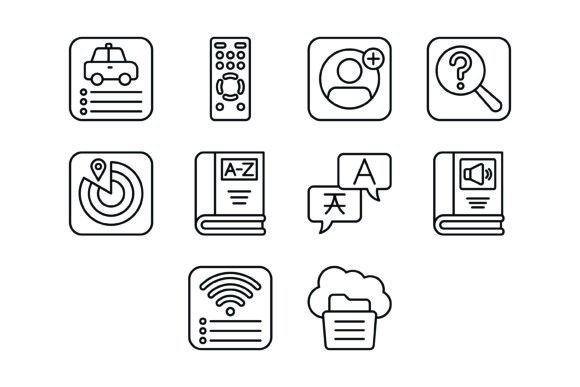
Understanding the specific contents of this bundle helps in appreciating its utility. The collection includes high-demand graphics such as the Car App Icon, perfect for ride-sharing or automotive service interfaces, and the Remote Control Icon, essential for smart home applications or IoT devices. Furthermore, the inclusion of the Contacts Icon and Search Icon covers the most fundamental needs of any database or directory system.
For those working on connectivity or utility projects, the bundle provides the Find My Gadget App Icon, the Wifi Connection Icon, and the Cloud Storage Icon. These are critical for software dealing with hardware management, network settings, or data synchronization. Additionally, content creators and educators will find the Dictionary Icon, Translator Icon, and Audio Book Icon particularly useful for language learning platforms or digital library interfaces.
Technical Versatility and File Formats
One of the most significant advantages of this bundle is the technical packaging. Designers frequently face compatibility issues when importing assets into different software. The 10 Home Screen Apps Outline Icons Bundle eliminates this friction by including five different file formats: AI, EPS, JPG, PNG (with transparent background), and SVG.
The inclusion of SVG (Scalable Vector Graphics) and EPS files is crucial for modern web development and mobile app design. These vector formats allow you to scale the icons to any size—from a small favicon to a large billboard—without any pixelation or loss of resolution. This scalability ensures that your design remains crisp on Retina displays and high-resolution screens. Conversely, the PNG files with transparent backgrounds are ready for immediate drag-and-drop use in presentations, social media graphics, or video editing timelines where vector manipulation isn't necessary.
Enhancing Workflow Efficiency
Time is a finite resource, especially for freelancers and small business owners juggling multiple roles. Searching for the right icon, converting file formats, and manually tracing bitmaps can consume hours of productive time. By integrating the 10 Home Screen Apps Outline Icons Bundle into your asset library, you bypass these repetitive tasks.
The icons are designed with maximum usability in mind. The line art style is minimalist and contemporary, ensuring they blend seamlessly with various design trends, from flat design to material design. Because they are easy to edit, you can adjust the stroke weight or color to match your specific brand guidelines in seconds using standard vector software like Adobe Illustrator or Sketch.
Practical Applications Across Industries
The utility of the 10 Home Screen Apps Outline Icons Bundle extends across a wide range of professional scenarios. Here is how different groups can leverage these assets:
- Mobile App Developers: Use the Car App Icon or Wifi Connection Icon to build intuitive tab bars or settings menus. The consistent line style ensures that the UI looks professional and uncluttered.
- Web Designers: Implement the Cloud Storage Icon or Search Icon in website headers or feature sections to visually communicate services without relying on text-heavy descriptions.
- Marketers and Bloggers: Enhance blog posts or newsletters by using the Audio Book Icon or Dictionary Icon to break up text and highlight key points, improving reader engagement.
- Educators: Create clear, visual aids for presentations using the Translator Icon or Contacts Icon to help students understand concepts related to communication and language.
- Small Business Owners: Use the Remote Control Icon for tech repair service menus or the Find My Gadget App Icon for security software branding.
Design Consistency and Scalability
A common pitfall in design projects is mixing icon styles—using a solid icon next to an outline icon, or mixing thick and thin strokes. This inconsistency can make a professional project look amateurish. The 10 Home Screen Apps Outline Icons Bundle provides a harmonious visual family. Because all 10 icons share the same design language, they can be used together on a single screen without looking disjointed. This is particularly important for "Settings" pages or "Dashboard" views where multiple icons appear side-by-side.
Moreover, the 100 vector icons feature mentioned in the file details ensures that you are working with high-quality vector paths. This means the files are lightweight, which contributes to faster load times for websites and apps—a critical factor for SEO and user retention.
Considerations for Implementation
While the 10 Home Screen Apps Outline Icons Bundle is robust, it is important to consider the context of your project. The outline style is excellent for modern, airy designs, but if your interface relies on high-contrast, solid fills for accessibility reasons, you may need to edit the vectors to fill the shapes. Fortunately, the editable nature of the AI and EPS files makes this adjustment straightforward.
Additionally, while the bundle covers essential utilities, you should ensure that the specific icons align with your app's core function. For instance, if your app is purely a calculator, the Car App Icon may not be relevant. However, for comprehensive utility suites or general-purpose mobile operating systems, this bundle provides a strong foundation.
Final Thoughts on Usability
The 10 Home Screen Apps Outline Icons Bundle represents a practical investment for anyone involved in digital creation. It moves beyond generic clipart to offer specific, recognizable symbols that solve real communication problems. By providing multiple file formats and a scalable vector structure, it respects the technical needs of the designer while delivering the visual clarity required by the end-user.
Whether you are building a new startup's landing page, refining a mobile interface, or simply organizing your digital library, having access to high-quality, ready-to-use icons accelerates your path to a polished final product. This bundle offers the specificity of niche icons—like the Find My Gadget App Icon—combined with the universality of standard utilities, making it a versatile addition to any creative toolkit.